SMS Terms & Opt-In Disclosure
Last updated: April 2026
Program Name
Airmates Flying Club Management — SMS Notifications
Program Overview
Airmates is a multi-tenant SaaS platform operated by AirDev LLC that provides management tools to flying clubs. Individual clubs operate on the Airmates platform under their own club name. SMS notifications sent to members are sent by Airmates on behalf of their club for club-related activities (booking reminders, payment receipts, past-due alerts, phone verification). All opt-in, opt-out, and data handling is managed centrally through the Airmates platform.
Call to Action — How Members Opt In
SMS notifications are off by default. Members must explicitly opt in through the following steps inside their authenticated account on airmatesacy.com:
- Log in to the Airmates web application at airmatesacy.com
- Navigate to My Account → Notifications tab
- Scroll to the Airmates SMS Notifications section
- Enter a valid US mobile phone number
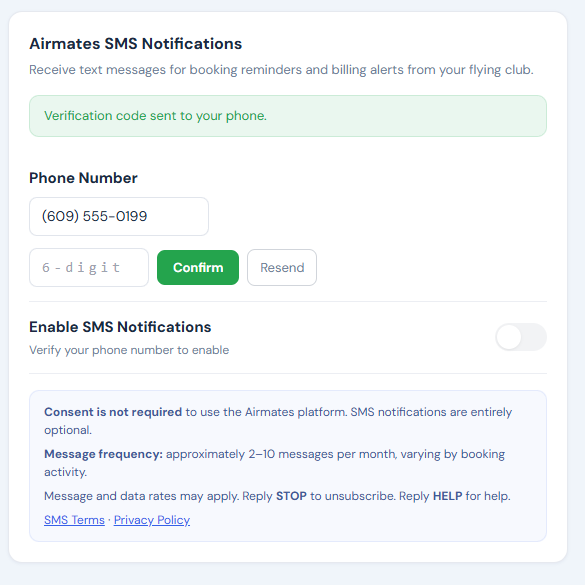
- Click “Verify” to receive a 6-digit verification code via text
- Enter the verification code to confirm ownership of the phone number
- Actively toggle “Enable SMS Notifications” to ON
Members must complete phone verification before SMS can be enabled. No text messages are sent until the member has verified their number and explicitly turned on the SMS toggle. Consent to receive SMS is not required to use the Airmates platform and is not a condition of purchase of any service.
TCR Reviewer Access — View the Live Opt-In UI
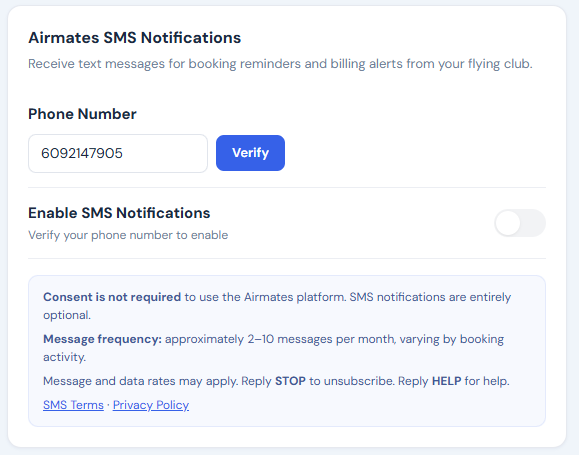
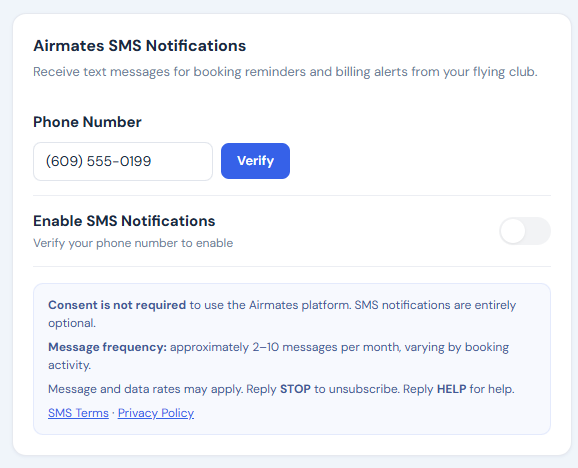
The SMS opt-in interface lives inside authenticated member accounts. We provide TCR reviewers with both live test credentials and static screenshots of the opt-in flow below. The screenshots confirm the disclosures are rendered on the same screen as the opt-in toggle and the toggle is off by default; the live credentials let reviewers interact with the flow end-to-end.
Step-by-step screenshots
Live Reviewer Access
Reviewer credentials are provided in the Twilio campaign submission’s “How do end-users consent to receive messages?” field. To verify the opt-in flow exists in the live production app:
- Go to airmatesacy.com
- Log in with the reviewer credentials provided in the campaign
- Click My Account (top-right profile menu) → Notifications tab
- Scroll to the Airmates SMS Notifications section at the bottom
You will see the live opt-in UI with the phone number field, Verify button, the SMS toggle (off by default for new members), and all required disclosures rendered on the same screen.
What Reviewers Will See
The live opt-in UI contains all of the following elements, rendered on the same screen as the opt-in toggle:
- Section heading: “Airmates SMS Notifications”
- Subtext: “Receive text messages for booking reminders and billing alerts from your flying club.”
- Phone Number input field and “Verify” button (6-digit SMS code verification required)
- An unchecked-by-default toggle labeled “Enable SMS Notifications” (disabled until phone is verified)
- Per-category sub-toggles for Bookings and Billing (both default to on if the master toggle is enabled)
- Disclosure block containing: “Consent is not required to use the Airmates platform. SMS notifications are entirely optional.”
- Message frequency: “approximately 2–10 messages per month, varying by booking activity.”
- “Message and data rates may apply. Reply STOP to unsubscribe. Reply HELP for help.”
- Hyperlinks to SMS Terms (this page) and Privacy Policy
Message Types & Frequency
Members who opt in may receive the following types of text messages:
- Booking reminders — sent up to 24 hours before a scheduled flight
- Booking confirmations — sent when a booking is created
- Booking cancellations — sent when a booking is cancelled
- Payment confirmations — sent after a successful payment is processed
- Past-due alerts — sent when an account balance is overdue
- Phone verification codes — sent when a member initiates phone verification
Estimated frequency: 2 to 10 messages per month, depending on booking activity and billing cycles. Message frequency varies by club and member activity.
Sample Messages
Airmates Flying Club: Reminder — you have a booking for N12345 tomorrow at 9:00 AM. Reply STOP to opt out.
Airmates Flying Club: Booking confirmed — N12345 on Apr 20 at 9:00 AM-11:00 AM. Reply STOP to opt out.
Airmates Flying Club: Payment of $200.00 received via card. Thank you! Reply STOP to opt out.
Airmates Flying Club: Your account has a past-due balance of $250.00. Please make a payment soon. Reply STOP to opt out.
Airmates (Airmates Flying Club): Your verification code is 123456. It expires in 10 minutes. Reply STOP to opt out.
How to Opt Out
You can stop receiving text messages at any time by:
- Replying STOP to any text message from Airmates
- Logging in and turning off the SMS toggle in My Account → Notifications
Additional opt-out keywords: STOP, CANCEL, END, QUIT, UNSUBSCRIBE, REVOKE, OPTOUT, STOPALL
After opting out, you will receive one final confirmation: “You have successfully been unsubscribed. You will not receive any more messages from this number. Reply START to resubscribe.”
To re-subscribe after opting out, reply START to the same number, then log back in and re-enable the SMS toggle in your Notifications settings.
How to Get Help
Reply HELP or INFO to any text message for assistance. You will receive: “Airmates SMS Notifications by AirDev LLC. For help, email darren@airdev.us. Reply STOP to unsubscribe. Msg&Data Rates May Apply.”
You can also contact us directly at darren@airdev.us.
Message & Data Rates
Message and data rates may apply. Check with your mobile carrier for details about your text messaging plan. AirDev LLC is not responsible for any charges from your carrier.
Supported Carriers
SMS notifications are available to US mobile phone numbers on all major carriers including AT&T, T-Mobile, Verizon, and most regional carriers. Carriers are not liable for delayed or undelivered messages.
Privacy
Your phone number is used solely for sending the transactional notifications described above. We do not sell, share, or transfer your phone number or SMS opt-in data to third parties for marketing purposes, and mobile opt-in data is not shared with affiliates or partner networks. See our full Privacy Policy for details on how we handle your data.
Contact Information
AirDev LLC
Richland, NJ
Email: darren@airdev.us
Website: airdev.us